|
|
|
|
|
|
|
|
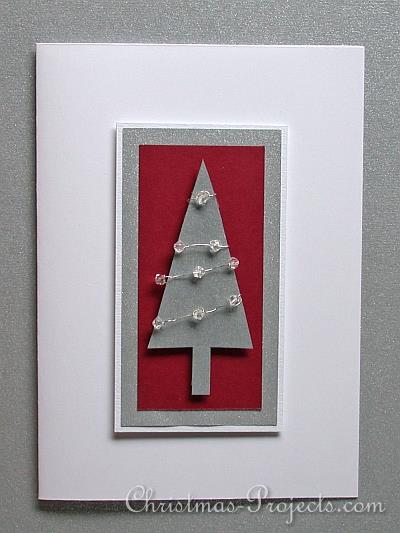
1. Adhere the silver cardstock over the center of the white cardstock piece. 2. Adhere the dark red cardstock piece over the center of the silver piece. 3. Print and cut the tree motif out of silver cardstock. 4. Cut 4 x 5cm lengths of silver wire. 5. On the first piece of wire, string 3 beads. Do this by inserting the wire through the first bead and then insert the wire through again to secure the bead. Add the second bead about 1 cm away and secure the same way. Add the third and secure again. Wrap the wire ends to the back side of the bottom of the tree in a diagonal way (see picture) and secure the ends with tape. 6. Repeat step 5 with the remaining 3 wires. On one wire, string 3 beads, on the next wire string 2 beads and on the last wire string only 1 bead. 7. Adhere the tree now to the card using foam tape to raise the tree and give it dimension.
|
|
|
|
|
|
|
|
|
|
|
|

|
Christmas Card with Beaded Tree
|
|
|
|
This elegant Christmas card is quick and easy to craft and perfect for those who want to make homemade cards but have little time to do so.
|
|
|
|
|
Time required: about 15 minutes Difficulty Level: Easy
|
|
|
|
|
|
|
- blank white card in standard size - strip of white cardstock measuring 10cm x 5.5 cm - strip of silver cardstock measuring 9 cm x 5 cm - strip of dark red cardstock measuring 8.5 cm x 4 cm - scrap piece of silver cardstock for the tree - thin silver beading wire - 9 x 3 mm glass beads in crystal color - 3-D foam tape - stick glue - adhesive tape
|
|
|
|
|
|
|
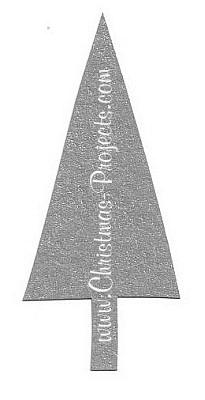
Craft Pattern for the Christmas Tree
|
|

|
|
Patterns may be printed out for personal use or for classroom use only. It is not permitted to reproduce any patterns for commercial profit.
Text and pictures found on this website belong exclusively to the website owner. It is not allowed to reproduce these for use on the internet or any other publication.
|
|
|
|
|
To use the pattern, use your right mouse button and click on the picture. Save to a designated file on your computer. From there, you can use your printing program to print out the pattern.
Tip: If you use Microsoft Photo Editor to open and to print out the pictures, you can change the size of the pattern to fit your needs before printing out.
If you use Irfan View, there is also a possibility to change the size of the pattern before printing out.
|
|
|
|